AI Bust-Generating Agent
Category: Agents
By: Lucien
2026-09-21 • 7 min read
From selfie to sculpture: building an AI bust-generating agent
Inside a PsiSpark project in development - September 2026
Imagine uploading a portrait, choosing bronze, and describing yourself as a battle-worn warrior with honey badgers embossed on your armour. The result: a personalised sculpture-style image that could become the centrepiece of a mug, T-shirt, hoodie or poster.
That is the experience we are building at PsiSpark. Our Bust Generating Agent project combines image editing, intelligent upscaling and background removal with a guided prompt mechanism. The goal is to make a creative workflow accessible through a few simple choices, with the technical work happening behind the scenes.
The project is still in development. We are using a local GPU setup and a selected model stack, while we refine the portrait and prompt workflow. The model stack and workflow are hosted on a scalable GPU SaaS platform. The customer-facing application, storefront agent integration and print-on-demand hand-off are the next layers to build and validate.
Start with a person and an idea
The intended experience asks for three inputs:
-
A portrait: the person whose likeness should guide the artwork.
-
A material: Bronze, Marble or Wood, with room to add more presets.
-
A description: the clothing, mood, motifs and finish the customer wants.
We are creating a two-dimensional image with the appearance of a sculptural bust. Here is the supplied example that helped shape the project.
The source portrait

sample_input_photo.jpg - the supplied 100 × 100, low quality, test portrait. A sharp, larger original will be expected in production.
The visual target
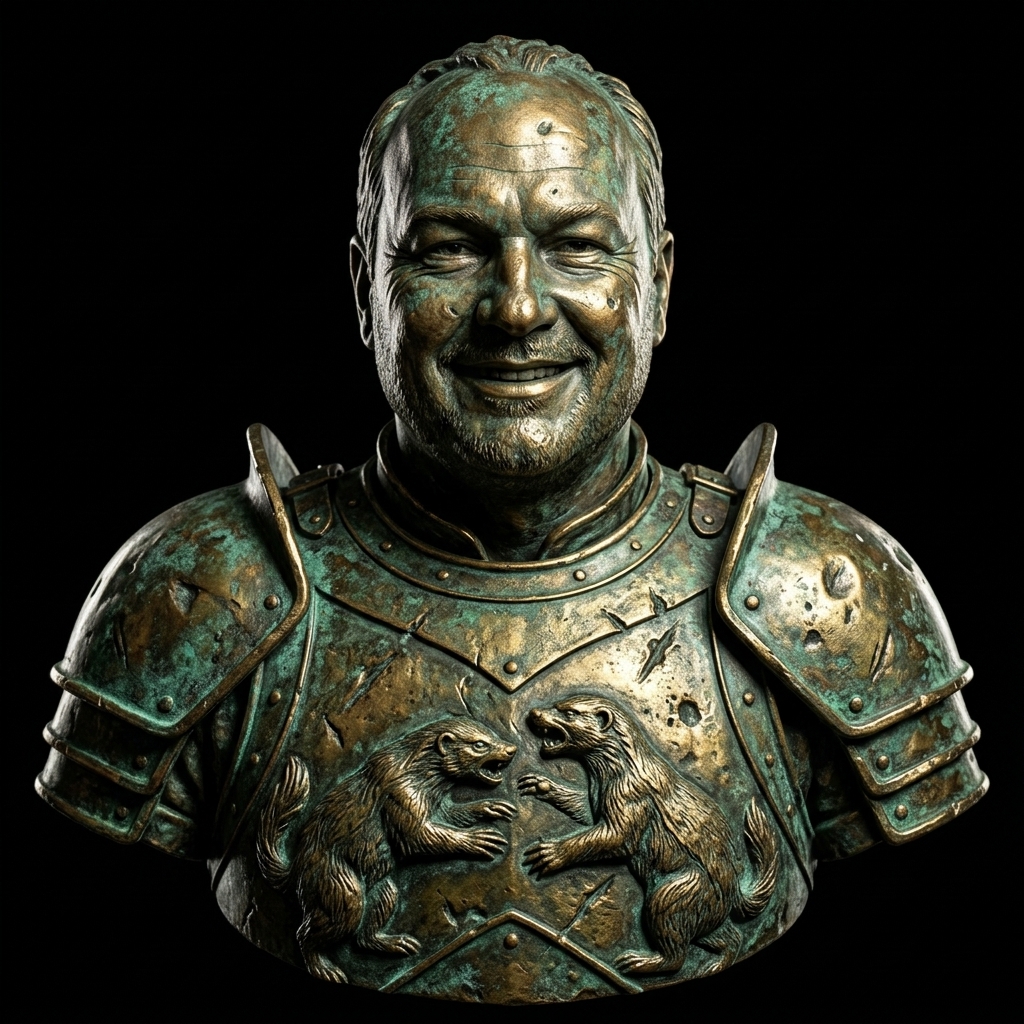
sample_output_photo.jpg - a sample image generated
We combine the customer's input image, their selections and free text prompt into curated input for our image generation workflow.
A simple interface, a carefully assembled prompt
Customers should be able to describe their idea in ordinary language. Our application supplies the consistent instructions around it.
The central mechanism is:
Final prompt = identity guidance
             + selected material preset
             + customer's description
             + composition, lighting and output guidance
The prompt builder maps a material choice to a fuller description:
| Customer selects | The application adds |
|---|---|
| Bronze | A heavy bronze bust sculpture. |
| Marble | A finely carved marble bust sculpture with subtle natural stone veining. |
| Wood | A hand-carved walnut wood bust sculpture with visible grain and fine tool marks. |
For our Bronze example, the customer supplies:
Wearing battle armor, well worn and scarred, with fierce honey badgers and a slightly oxidized green-and-gold patina.
Our guidance adds the framing, lighting and isolation needed for a reusable artwork asset. In the original concept, that was expressed as “harsh dramatic lighting” and a request for a transparent background suitable for mugs, T-shirts, hoodies and posters.
The implementation makes that last requirement more concrete: generate the bust against a simple pale background, then remove that background in a dedicated processing stage. A prompt asking for transparency and a negative prompt rejecting fake transparency cannot guarantee an actual transparent image file.
flowchart TD
    S[Material selection: Bronze] --> M[Look up bronze material preset]
    D[Customer description: armour, badgers, patina] --> P[Assemble final prompt]
    M --> P
    G[Application guidance: likeness, framing, lighting, background] --> P
    P --> Q[Qwen image editing]
    I[Customer portrait: only identity image] --> Q
PsiSpark diagram: how the application assembles the customer's request.
The prompt builder is ordinary, deterministic application logic. It validates the style, rejects an empty description and combines the inputs with our guidance. A separate language model is not required just to join these pieces together. The same inputs produce the same prompt text, although generated images can still vary with the seed and generation settings.
The models behind the artwork
Our agent connects the processing steps into a visual workflow and executes them. The selected stack contains five model files with distinct jobs:
| Component | Role in this project |
|---|---|
| Qwen-Image-Edit-2511, FP8 mixed weights | Transforms the portrait according to the assembled prompt. |
| Qwen2.5-VL-7B, FP8 text/vision encoder | Supplies representations of the instructions and image content to guide the edit. |
| Qwen Image VAE | Converts between image pixels and the compact representations used during generation. |
| RealESRGAN_x4plus | Enlarges the generated artwork by 4× in width and height. |
| BiRefNet | Predicts the foreground mask used to isolate the bust and create transparency. |
Qwen: understand the request and transform the portrait
Qwen-Image editing uses complementary views of the input: Qwen2.5-VL supplies semantic information, while the VAE encodes visual appearance. A multimodal diffusion transformer uses the conditioning information to generate the edited image representation, which the VAE decodes into pixels. This provides a basis for changing the material and clothing while aiming to retain recognisable features. Qwen's image-editing introduction.
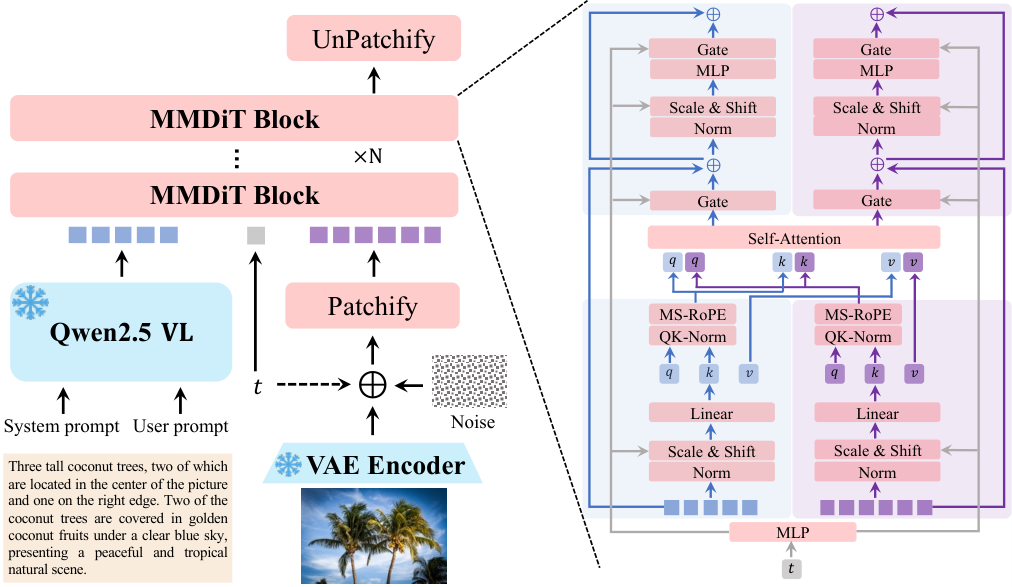
Source: Qwen Team, Qwen-Image Technical Report, Figure 6. This is the published base-family architecture, not a diagram of our customised model graph.
Real-ESRGAN: enlarge the generated image
The upscaler uses a trained super-resolution network to produce a larger image with plausible fine detail. Its generator contains residual-in-residual dense blocks that learn how to reconstruct detail from lower-quality inputs. Our selected x4plus model provides 4× enlargement. Real-ESRGAN paper, official model catalogue.
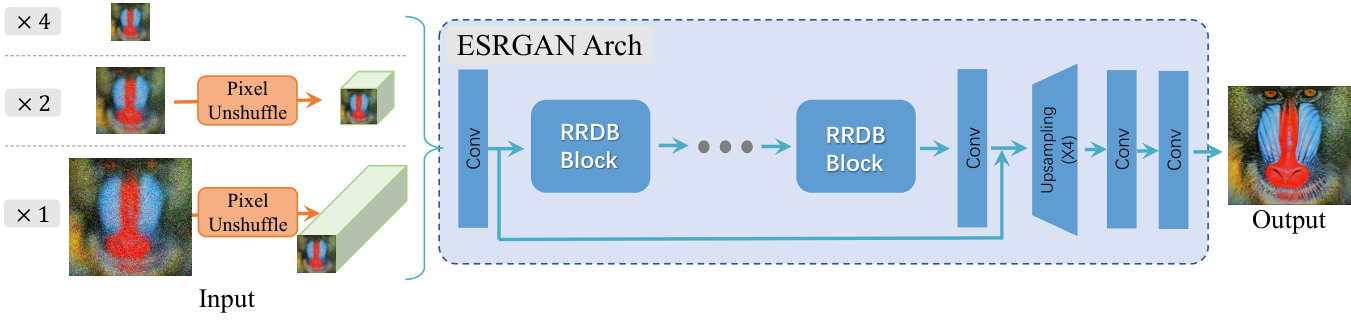
Source: Xintao Wang and colleagues, Real-ESRGAN, Figure 4. The figure includes scale variants; this project selects the 4× model.
Larger dimensions give us more flexibility when preparing product layouts. They do not recover a perfect original face from a tiny avatar or automatically make an image ready for printing.
BiRefNet: separate the bust from its backdrop
BiRefNet locates the foreground and reconstructs a detailed segmentation mask. Its architecture combines broad object information with fine image detail and boundary guidance. In our workflow, that mask supports an alpha channel: the transparency information in the exported PNG. BiRefNet research paper.
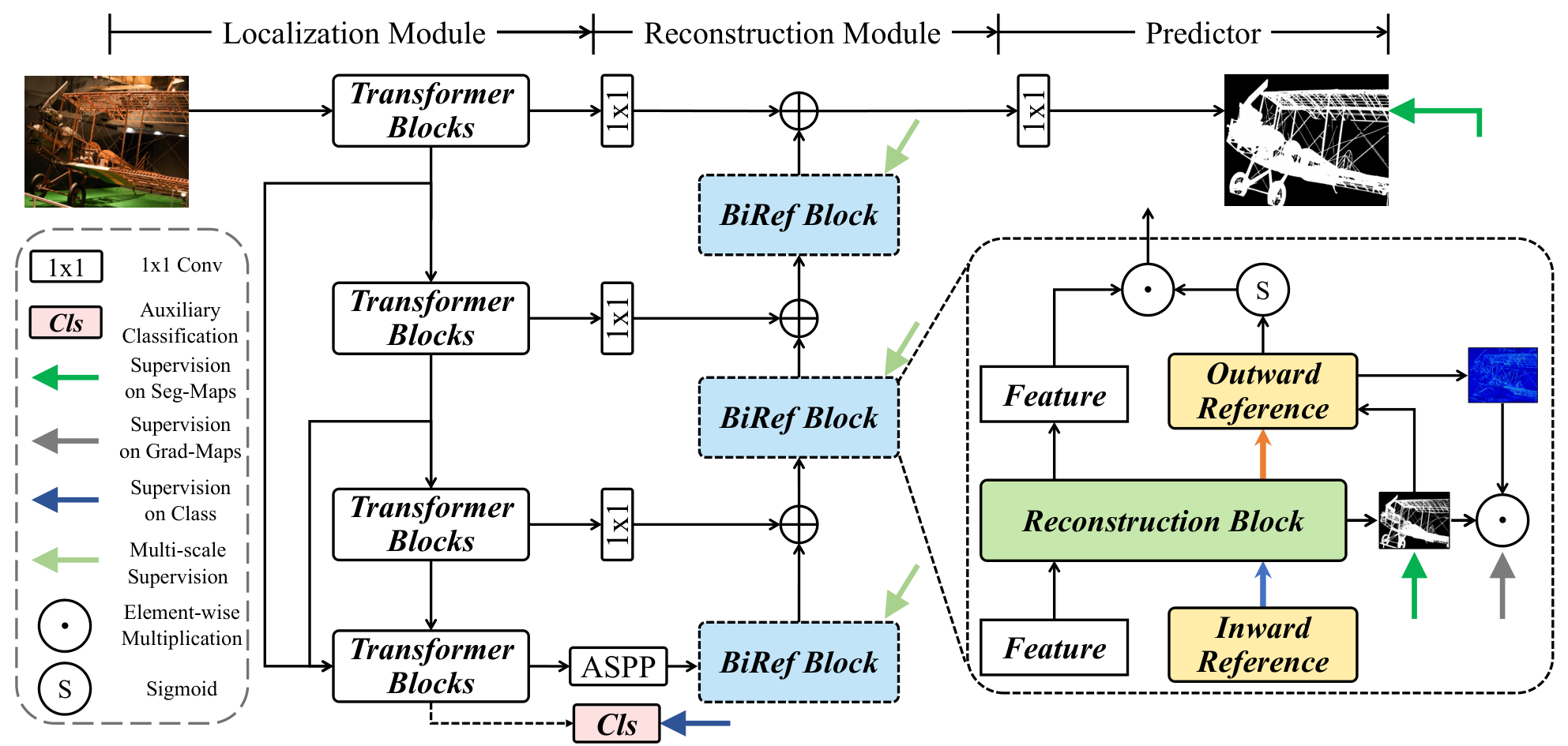
Source: Peng Zheng and colleagues, BiRefNet, Figure 3, licensed under CC BY 4.0. Figure reproduced unchanged.
The distinction matters for merchandise: a black or white rectangle around a portrait is very different from a cutout that can sit naturally on a garment or mug.
How the pieces fit together
The intended processing chain is straightforward:
flowchart TD
    A[Portrait + material + description] --> B[Validate inputs and build prompt]
    B --> C[Agent executes the workflow]
    subgraph Q[Qwen editing stage]
        D[Qwen2.5-VL: semantic conditioning]
        E[VAE encoder: image representation]
        F[Qwen-Image-Edit-2511: generate edited representation]
        G[VAE decoder: render bust image]
        D --> F
        E --> F
        F --> G
    end
    C --> D
    C --> E
    G --> H[RealESRGAN_x4plus: enlarge]
    H --> I[BiRefNet: foreground mask]
    I --> J[Apply transparency and save PNG]
    J --> K[Review likeness, material and cutout edges]
    K --> L[Fit approved artwork to product template]
PsiSpark diagram: the target workflow, including the planned review and product-preparation steps.
The planned FastHTML/Psi-Daisy web application will manage customer inputs and job results, while a separate SaaS worker performs generation. This gives us a clear boundary between the customer experience and the GPU workload.
Turning the workflow into an agent capability
Once the workflow is reliable, we can expose it through Model Context Protocol (MCP). MCP provides a standard way for an AI application to discover and call tools supplied by a server. In this design, the server would expose our bust service, and the agent would coordinate the user's request. Official MCP architecture.
For example, a customer could ask an assistant:
Use my portrait to create a bronze warrior bust with honey badger armour. Show me the artwork before preparing a hoodie design.
The assistant could collect any missing inputs, call the generation tool, check progress and return a preview. Our application would still own prompt composition and the approved workflow settings.
sequenceDiagram
    actor Customer
    participant Agent as AI assistant / MCP client
    participant MCP as Proposed Bust MCP server
    participant Service as Bust application service
    participant Worker as SaaS worker
    Customer->>Agent: Portrait, bronze style and design description
    Agent->>MCP: generate_bust(photo_id, style, description)
    MCP->>Service: Validate request and assemble prompt
    Service->>Worker: Submit generation job
    Worker-->>Service: Job identifier
    Service-->>MCP: Job identifier
    MCP-->>Agent: Job identifier
    Agent->>MCP: get_bust_status(job_id)
    MCP->>Service: Read job progress
    Service-->>MCP: Status and result reference when ready
    MCP-->>Agent: Status and preview link
    Agent-->>Customer: Present artwork for review
PsiSpark diagram: proposed integration as an MCP service.
A small tool interface could offer list_bust_styles, generate_bust, get_bust_status and get_bust_result. Returning a job identifier lets the assistant handle generation as a task that takes time, rather than pretending the result is immediate. A future product-preparation tool could fit approved artwork to a chosen supplier template.
The conversational agent model has not been selected in this project. Qwen2.5-VL currently has a specific job inside the image pipeline; a future assistant would add a separate layer for conversation and tool use.
Building towards a useful creative product
The appeal is personal: a familiar face reimagined as bronze, marble or carved wood. The engineering challenge is repeatability: preserving likeness, following the requested design, producing clean edges and preparing an asset that works on the selected product.
Our next validation work is to run the revised workflow with better portraits, compare materials, inspect the transparent exports and test product-specific layouts.
We are also working on streamlining the workflow. We have reduced the image generation from 5 minutes to under 20 seconds.
For PsiSpark, this project is a practical example of how to combine specialist AI models, explicit application rules and an accessible interface around a customer outcome. The same approach can support other creative services: guide the request, coordinate the right tools and make the result easy to review and use.
Have a creative process you would like to turn into an AI-powered service? Talk to PsiSpark about building a focused prototype.